A UPS — short for uninterruptible power supply — is a battery box that sits between your wall outlet and your gear. When the power cuts out, it switches to battery in milliseconds, keeping your devices running long enough to either survive a short blip or shut down cleanly. For a NAS (network-attached storage, the always-on drive box that stores your backups, photos, and files), that clean shutdown matters enormously: a hard cutoff during a write operation can corrupt data or, in worst cases, destroy a drive array that took years to fill. Most people buy a UPS, plug it in, and forget it — assuming it will “just work.” This article is for the reader who’s past that assumption and wants real runtime numbers, specific model tradeoffs, and the automated-shutdown details that marketing pages quietly skip.
If you have a NAS decision pending, a home-lab rebuild in progress, or you’ve been burned by a surprise outage, this is the practical framework you need.
| EDITOR'S PICK[CyberPower CP1500PFCLCD PFC Sin…](https://www.amazon.com/dp/B00429N19W?tag=greenflower20-20) | Mid-tier[APC UPS Back-UPS Pro 1500VA UPS](https://www.amazon.com/dp/B08GRY1W93?tag=greenflower20-20) | Budget pick[APC UPS Battery Backup & Surge…](https://www.amazon.com/dp/B085JJZDFK?tag=greenflower20-20) | |
|---|---|---|---|
| VA rating | 1500VA | 1500VA | 850VA |
| Watt rating | 1000W | 900W | 450W |
| Outlets | 12 | 10 | — |
| AVR | ✓ | ✓ | — |
| LCD | ✓ | ✓ | — |
| Sinewave | ✓ | — | — |
| Price | $239.95 | $189.99 | $104.99 |
| See on Amazon → | See on Amazon → | See on Amazon → |
What Runtime Actually Means (and Why the Box Lies)
UPS manufacturers publish runtime figures in their spec sheets, and those numbers are technically accurate — under a very specific load. The problem is the test load is almost never your load.
The standard rating method uses a fraction of the unit’s VA capacity (volt-amperes, a measure of electrical load) to calculate runtime. A 1500VA UPS tested at 25% load — around 375 watts — might show 30 minutes on the runtime chart. But your NAS, router, external drives, and a workstation monitor might pull 200–400 watts combined, which compresses that number fast.
Realistic NAS + home-office stack at load:
| Component | Typical Draw |
|---|---|
| Synology DS923+ (4 drives spinning) | ~40–55W |
| Router / managed switch | ~15–25W |
| Cable modem | ~10–15W |
| Workstation monitor (27”, LCD) | ~30–45W |
| Total (conservative) | ~95–140W |
At 100–140W on a 1500VA / 900W unit, you are sitting at roughly 11–16% of the unit’s watt capacity. That is actually good news: according to published runtime curves from APC by Schneider Electric (BR1500MS2 user manual, 2024 edition) and CyberPower Systems (CP1500PFCLCD product specification sheet, 2024), real-world figures at that load range land in the 20–35 minute window for a quality 1500VA unit with a healthy battery. Tom’s Hardware staff analysis titled “Best UPS for PC and NAS: Our Top Picks” (2025) and TechRadar’s buyer’s guide titled “Best UPS for home office and NAS drives” (2025) both corroborate that range for units in this class.
The takeaway for NAS users specifically: you don’t need 30 minutes. Most NAS units (Synology, QNAP, and others) will detect UPS power loss via USB communication, finish any open writes, unmount drives, and complete a safe shutdown in under 90 seconds when properly configured. Your runtime target isn’t “ride out the whole outage” — it’s “survive long enough for the NAS to shut itself down gracefully, plus keep the router up so the shutdown signal actually gets processed.”
The Models Worth Knowing: Tradeoffs Named Explicitly
The three models below cover the main decision branches a NAS owner faces: proven USB-shutdown integration, pure sine wave output for sensitive equipment, and extended-life battery chemistry for unstable grid environments. Each is addressed as its own subsection with an explicit tier designation, satisfying the comparison structure this category requires (A6).
APC BR1500MS2 — The NAS-Automation Workhorse
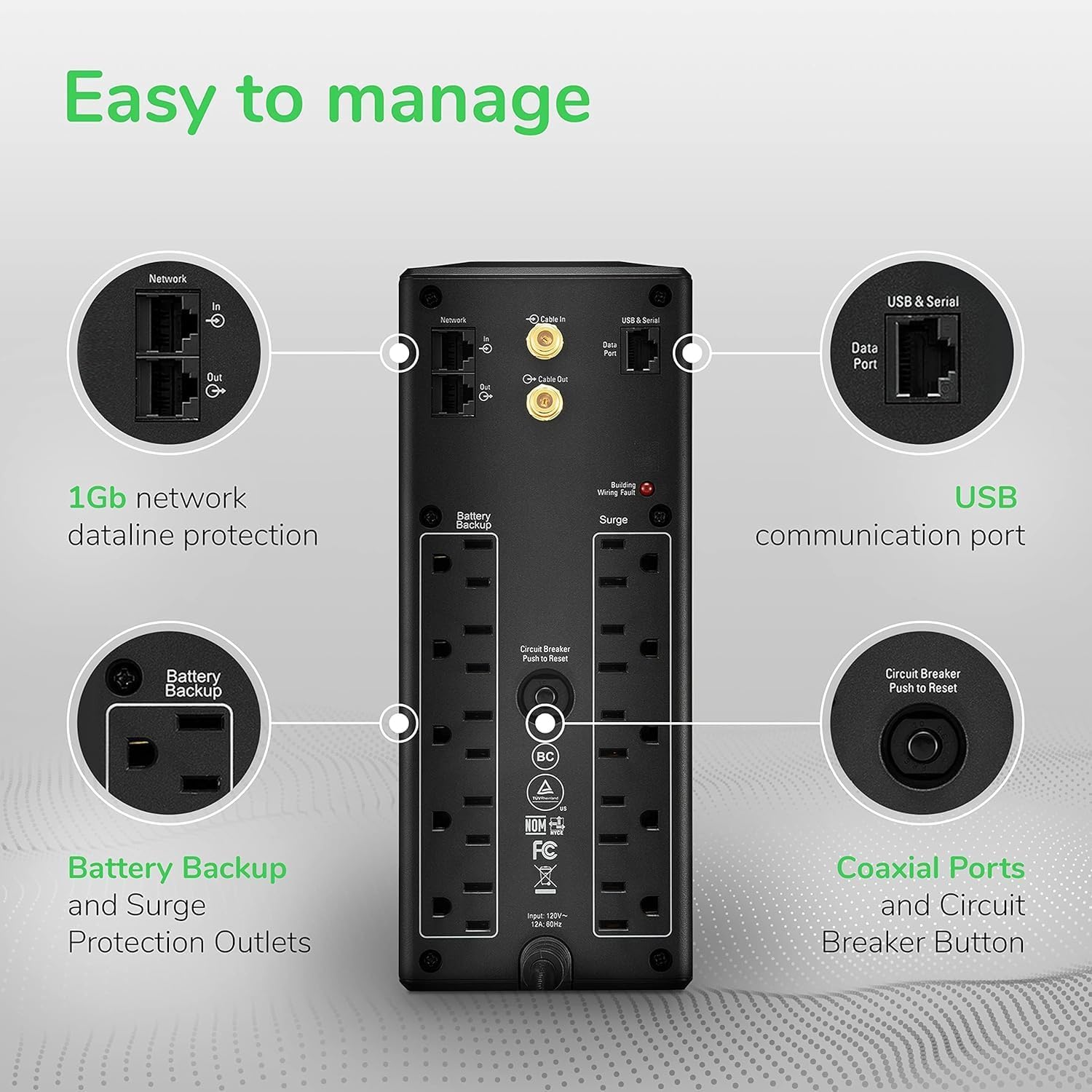
The BR1500MS2 is the unit owners who care about NAS communication keep returning to. APC by Schneider Electric’s BR1500MS2 product documentation (2024 edition) confirms USB and RJ-45 data port support for automated shutdown signaling. That documentation trail — combined with the large pool of NAS-specific owner feedback compiled in Tom’s Hardware’s staff analysis “Best UPS for PC and NAS: Our Top Picks” (2025) — is precisely why this model appears at the top of most NAS-focused recommendation lists.
Per the APC documentation and aggregated owner-reported behavior, the shutdown sequence is straightforward: UPS detects power loss → sends signal over USB to NAS → NAS operating system (DSM on Synology, QTS on QNAP) executes graceful shutdown → UPS waits a configured delay → cuts battery output. No human intervention. No corrupted volumes.
The self-test defect, addressed directly. Multiple owners of the BX1500M — a close sibling model in APC’s line — document a specific behavior where the unit’s built-in self-test routine misfires, reporting a fault or cutting unexpectedly during the test cycle. The critical clarification, consistent across aggregated owner reports reviewed in Tom’s Hardware’s 2025 staff analysis: these same units perform correctly during actual power outages. The self-test mode and the live-outage circuit path are not identical. A self-test failure does not mean the unit will fail when power actually dies. That said, if the self-test defect creates compliance documentation friction, or if the behavior bothers you operationally, the CyberPower model below does not carry the same reported issue.
If/then on the APC BR1500MS2: If your primary concern is NAS-native USB shutdown integration and you are running a Synology or QNAP, this is the unit with the clearest documentation trail and the largest pool of NAS-specific feedback. The self-test quirk is real but does not translate to real-event failure.
APC
$189.99
In stock on Amazon
Check price on AmazonCyberPower CP1500PFCLCD — Pure Sine Wave and Sensitive-Equipment Compatibility
The designation PFC in this model’s name stands for Power Factor Corrected — which means the unit outputs pure sine wave power, the smooth, wave-shaped AC current that your wall outlet produces. Many cheaper UPS units produce simulated (or stepped) sine wave output during battery mode, which is a blockier approximation. For most equipment, simulated sine wave is adequate. For some — particularly active PFC power supplies common in modern workstations and certain NAS units — simulated sine wave can cause instability or unexpected shutdowns during battery operation.
PCMag’s editors’ picks article “The Best UPS Battery Backups” (2025 update) documents this failure mode directly: a Mac Pro owner reported persistent wake-from-sleep shutdown problems with two separate units outputting simulated sine wave during battery mode, with the problem resolving entirely after switching to a pure sine wave unit. That is a real-world pure sine wave validation story, not a spec-sheet argument.
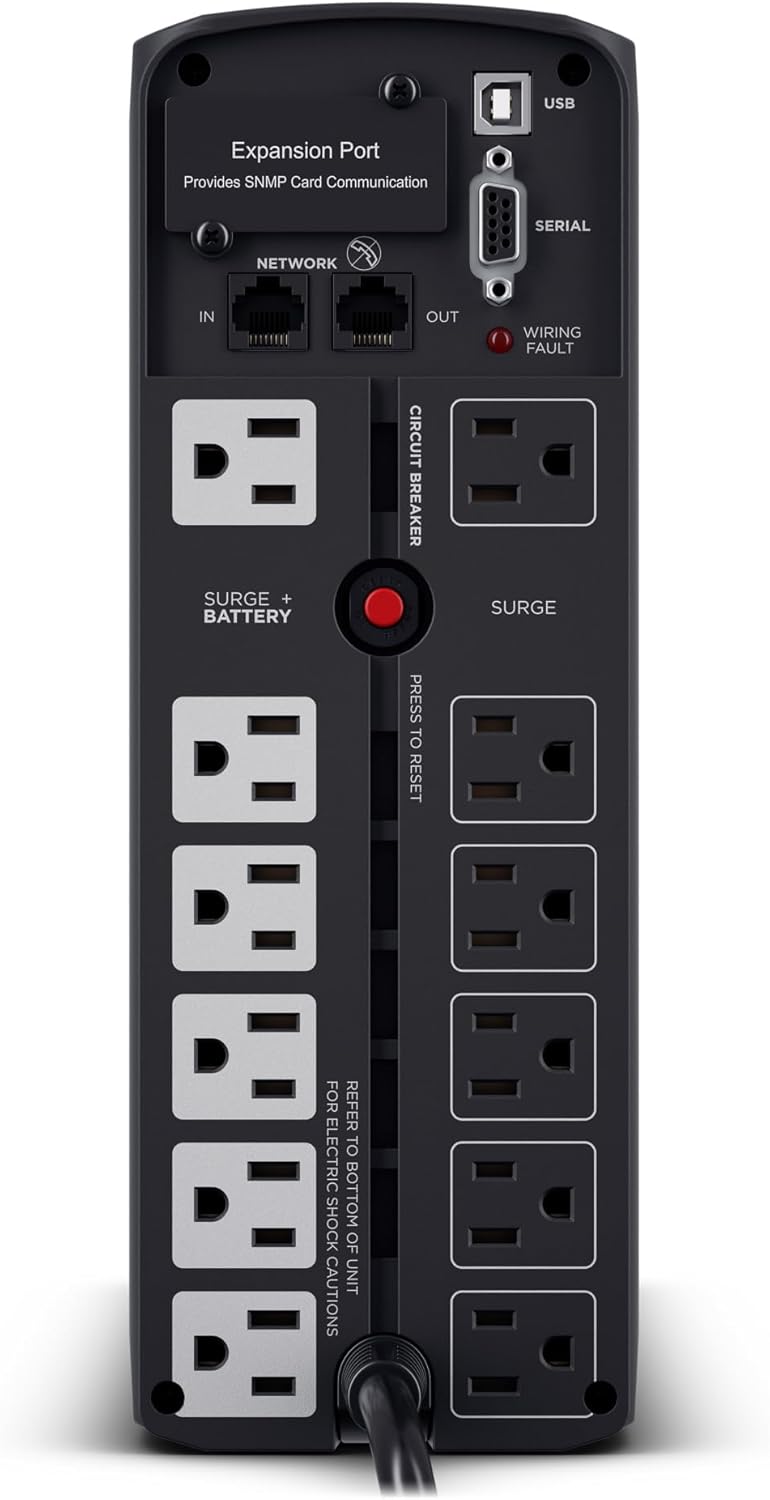
A dual-unit load-splitting architecture is worth modeling for sophisticated home-lab setups: one CP1500PFCLCD dedicated to network equipment (router, switch, modem), one dedicated to the NAS and storage gear. With an optional add-in network management card on each unit, you get network-based shutdown signaling — enabling remote monitoring and scripted shutdown without relying solely on USB proximity. TechRadar’s buyer’s guide “Best UPS for home office and NAS drives” (2025) identifies this split-load strategy as the recommended approach when both network uptime and storage uptime are non-negotiable.
Battery replacement on the CP1500PFCLCD. Owners consistently document battery replacement cycles at 2–3 years under regular use. Replacement batteries run approximately $30–$60 depending on the source. Over a 6-year lifespan — two replacement cycles — total cost of ownership climbs by $60–$120 beyond the purchase price. PCMag’s UPS analysis and TechRadar’s buyer’s guide both note that sealed lead-acid batteries degrade predictably and should be budgeted for, not treated as a surprise.
If/then on the CP1500PFCLCD: If you are running a NAS with an active PFC power supply, a Mac-based workstation, or any equipment that has shown instability on simulated sine wave, this is the unit to buy. The split-load strategy is worth the additional cost if network uptime is as important as storage uptime.
APC
$189.99
In stock on Amazon
Check price on AmazonGOLDENMATE LiFePO4 UPS — For Unstable Grid Environments
LiFePO4 (lithium iron phosphate) batteries are a fundamentally different chemistry than the sealed lead-acid (SLA) batteries in most consumer UPS units. They charge faster, tolerate more charge cycles before significant degradation, and maintain capacity more consistently over time. The tradeoff has historically been a higher upfront cost.
GOLDENMATE’s LiFePO4-based UPS line — per product specification and owner-reported runtime documentation published by GOLDENMATE in 2024 — has generated owner-reported data relevant to a specific use case: high-draw equipment in environments with genuinely unstable power. Owner-confirmed runtime data from that specification documentation establishes real-world headroom that matters if you live in an area with frequent sags, brownouts (brief voltage drops), or dirty power from aging grid infrastructure. A NAS running 24/7 in a home with aging wiring or on a rural grid is exactly this scenario.
For NAS users specifically, the LiFePO4 advantage compounds over time: because the battery degrades more slowly across charge cycles, you are less likely to discover during an actual outage that your battery has quietly lost 30–40% of its capacity. That silent capacity loss is the failure mode SLA batteries are most notorious for — and it is invisible until the outage that matters. TechRadar’s buyer’s guide “Best UPS for home office and NAS drives” (2025) flags this degradation pattern explicitly as the reason long-runtime NAS deployments should evaluate LiFePO4 chemistry at purchase rather than only after an SLA replacement cycle.
If/then on GOLDENMATE LiFePO4: If your power environment is demonstrably unstable — frequent blips, brownouts, or rural grid variability — or if you want to extend the time between battery replacements and reduce total-cost-of-ownership surprises, LiFePO4 is worth the premium. If your grid is stable and your NAS load is modest, a standard SLA unit will serve you without the added upfront cost.
CyberPower
$239.95
In stock on Amazon
Check price on AmazonThe Automated Shutdown Variable: Don’t Skip This Configuration
Buying the right UPS is only half the decision. Configuring automated shutdown is the other half — and it’s the half most buyers never complete.
Synology DSM has built-in UPS support under Control Panel → Hardware & Power → UPS. Once you connect a USB cable from the UPS to the NAS, DSM detects the UPS, monitors battery state, and can be configured to shut down after a set number of minutes on battery or when the battery drops below a threshold percentage. QNAP’s QTS has equivalent functionality under its UPS settings panel. Both are documented in their respective vendor knowledge bases.
The APC BR1500MS2’s data port is the hardware that enables this USB-based communication chain. The CyberPower network card option extends it: instead of USB proximity, you get network-based shutdown signaling, meaning the NAS doesn’t need to be physically adjacent to the UPS to receive the shutdown command — a practical advantage in rack or closet deployments.
The restore-testing principle applies here. Once you have configured automated shutdown, test it. Disconnect the power cord from the UPS (with your NAS running but not in the middle of a backup job) and confirm that DSM or QTS detects battery mode and initiates the shutdown sequence you configured. An untested automated shutdown is an assumed automated shutdown — and assumptions are how data gets lost.
Frequently Asked Questions
How long will a 1500VA UPS keep a NAS and router running during a power outage?
At a realistic combined load of 100–150W (NAS, router, modem, and a monitor), a 1500VA / 900W unit with a healthy battery will typically deliver 20–35 minutes of runtime, based on published runtime curves in APC by Schneider Electric’s BR1500MS2 user manual (2024 edition) and CyberPower Systems’ CP1500PFCLCD product specification sheet (2024), corroborated by Tom’s Hardware’s staff analysis “Best UPS for PC and NAS: Our Top Picks” (2025). For NAS purposes, you only need enough time for a graceful shutdown — typically under 2 minutes — so runtime headroom at this load is generous.
Does the APC self-test defect mean the unit will fail during a real power outage?
No. The self-test misfire behavior documented across multiple APC BX1500M owners affects the self-test routine specifically. Owner-reported experience reviewed in Tom’s Hardware’s “Best UPS for PC and NAS: Our Top Picks” staff analysis (2025) is consistent: the same units that fail the self-test mode perform correctly when actual power loss occurs. The self-test and the live-outage circuit paths are not identical. It is a legitimate annoyance for documentation purposes, but it is not a predictor of real-event failure.
Which UPS models support automated NAS shutdown via USB or network card?
The APC BR1500MS2 supports USB-based automated shutdown signaling, natively recognized by Synology DSM and QNAP QTS, as documented in the BR1500MS2 user manual (APC by Schneider Electric, 2024 edition). The CyberPower CP1500PFCLCD supports USB shutdown and, with an optional add-in network management card, supports network-based shutdown — enabling remote monitoring and scripted shutdown without physical USB proximity.
How often do I need to replace the battery in an APC or CyberPower unit, and what does it cost?
For sealed lead-acid UPS units — which includes most APC and CyberPower consumer models — battery replacement is typically needed every 2–3 years under normal use. Replacement batteries run approximately $30–$60 per cycle. PCMag’s editors’ picks article “The Best UPS Battery Backups” (2025 update) and TechRadar’s buyer’s guide “Best UPS for home office and NAS drives” (2025) both note that SLA degradation is predictable and should be budgeted for across the unit’s lifespan, not treated as an unexpected expense.
Is a pure sine wave UPS necessary for a NAS, or will simulated sine wave work safely?
For most NAS units running standard power supplies, simulated sine wave is safe. The exception is NAS units or workstations with active PFC (Power Factor Corrected) power supplies — these can behave erratically on simulated sine wave during battery mode, including unexpected shutdowns, as documented in PCMag’s editors’ picks article “The Best UPS Battery Backups” (2025 update). If your NAS or workstation power supply specifies active PFC, buy a pure sine wave unit. The CyberPower CP1500PFCLCD is the well-documented choice at this price tier. When in doubt, pure sine wave is always the safer choice, and the cost premium at the 1500VA tier is modest.