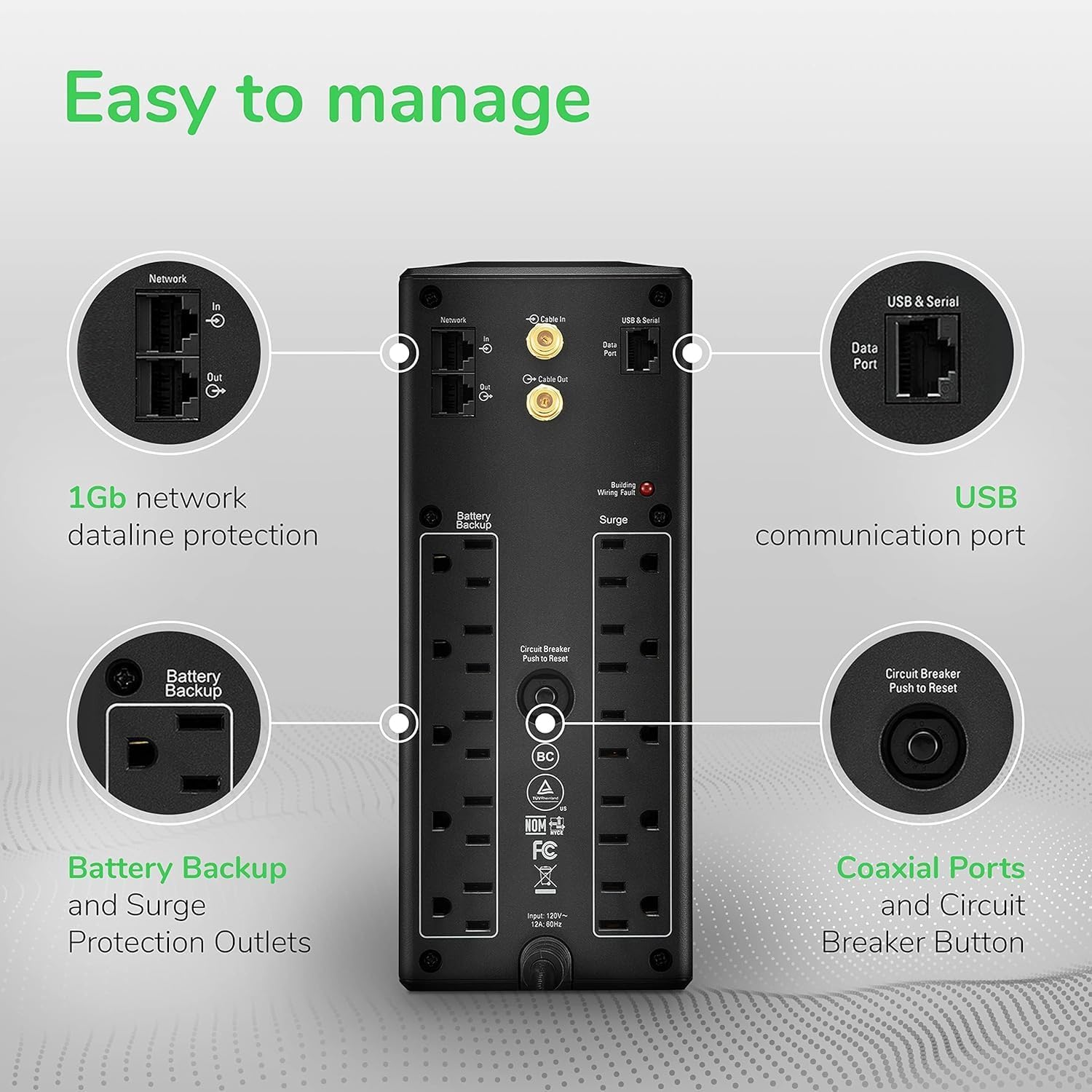
Let’s start with a real crash — not a hypothetical one. A Mac Pro owner running a home studio had been chasing an infuriating problem for months: every time a power fluctuation hit, the machine would wake from sleep and then immediately shut down hard, bypassing the normal shutdown sequence entirely. The culprit turned out not to be macOS, not the GPU, and not a failing PSU. It was the UPS — specifically, the stepped approximation sine wave output from an older unit. Switching to a pure sine wave model resolved the crashes completely. That’s not an edge case. That’s a preview of the decision you’re about to make.
A UPS — Uninterruptible Power Supply — is a battery-equipped box that sits between your wall outlet and your equipment. When power fails or dips, it instantly switches to battery so your devices keep running long enough to shut down safely, or to ride out a short outage entirely. The “pure sine wave” part refers to the shape of the electrical current it outputs. Utility power from your wall delivers a smooth, wave-shaped current. Cheaper UPS units fake it with a blocky staircase approximation. Most devices tolerate that. Modern power supplies — especially in Apple hardware, NAS units, and active PFC (Power Factor Corrected) desktop PSUs — increasingly do not.
If you’re running a NAS, a home office workstation, or both, here’s what this article delivers: a clear comparison between the two dominant mid-market pure sine wave UPS lines, the math to size your unit correctly, and a direct decision rule for which one to buy given your specific setup.
| EDITOR'S PICK[CyberPower CP1500PFCRM2U PFC Si](https://www.amazon.com/dp/B0B354X985?tag=greenflower20-20)… | Mid-tier[CyberPower CP1500PFCLCD PFC Sin](https://www.amazon.com/dp/B00429N19W?tag=greenflower20-20)… | Budget pickAPC UPS Battery Backup & Surge… | |
|---|---|---|---|
| Form factor | 2U rackmount | Mini tower | — |
| Runtime at load | — | — | 35 min |
| Outlet count | 8 | 12 | — |
| VA rating | 1500VA | 1500VA | 850VA |
| Watt rating | 1000W | 1000W | 450W |
| AVR | ✓ | ✓ | — |
| Price | $299.95 | $239.95 | $104.99 |
| See on Amazon → | See on Amazon → | See on Amazon → |
Why “Pure Sine Wave” Is Not Just Marketing Language
Simulated (or “stepped approximation”) sine wave UPS units work fine for many loads: basic desktop PCs with older PSU designs, monitors, routers, and simple NAS units. The problem is that active PFC power supplies — which became standard in quality desktop PSUs after roughly 2010, and are universal in modern Macs — can actually shut down or behave erratically on simulated sine wave output during the battery transfer window. The “transfer window” is the milliseconds when the UPS switches from wall power to battery; on a simulated unit, that transition produces a waveform the active PFC supply can interpret as a fault.
Tom’s Hardware’s UPS Buying Guide: What to Look for in a Battery Backup (2024) explains this directly: active PFC supplies are designed to draw current in a specific pattern synchronized to the incoming waveform. When the waveform becomes a staircase instead of a smooth wave, some PSUs simply stop — which is exactly what the Mac Pro owner described above was experiencing.
PCMag’s article The Best UPS Battery Backups (2025) makes the same point: if you’re running a NAS, a modern gaming PC, or any Apple hardware, pure sine wave output should be treated as a non-negotiable requirement, not a premium feature.
The practical takeaway: if your NAS or workstation has ever flickered, restarted unexpectedly during a brownout, or exhibited the wake-crash behavior described above, step one is confirming your UPS output type before spending any further time on diagnostics.
APC BR1500MS2 vs. CyberPower CP1500PFCLCD: Head-to-Head Comparison
These two units are the dominant pure sine wave options in the 1500VA class — the sweet spot for a NAS-plus-router or NAS-plus-workstation setup in a home office. Here is how the comparison actually breaks down across the dimensions that matter most to home office and NAS users.
Specifications and Value: Entry Point for Each Line
| Feature | APC BR1500MS2 | CyberPower CP1500PFCLCD |
|---|---|---|
| VA / Watts | 1500VA / 900W | 1500VA / 1000W |
| Output waveform | Pure sine wave | Pure sine wave |
| Battery type | Sealed lead-acid (SLA) | Sealed lead-acid (SLA) |
| Expected battery life | 3–5 years | 3–5 years |
| LCD display | Yes | Yes |
| Management interface | USB | USB |
| Est. runtime at 300W load | ~12–15 min | ~14–17 min |
Both units are rated for active PFC compatibility. Both offer software-based UPS management for scheduled shutdowns. At this specification level, neither unit has a decisive advantage on paper — the differentiation lives in real-world behavior patterns.
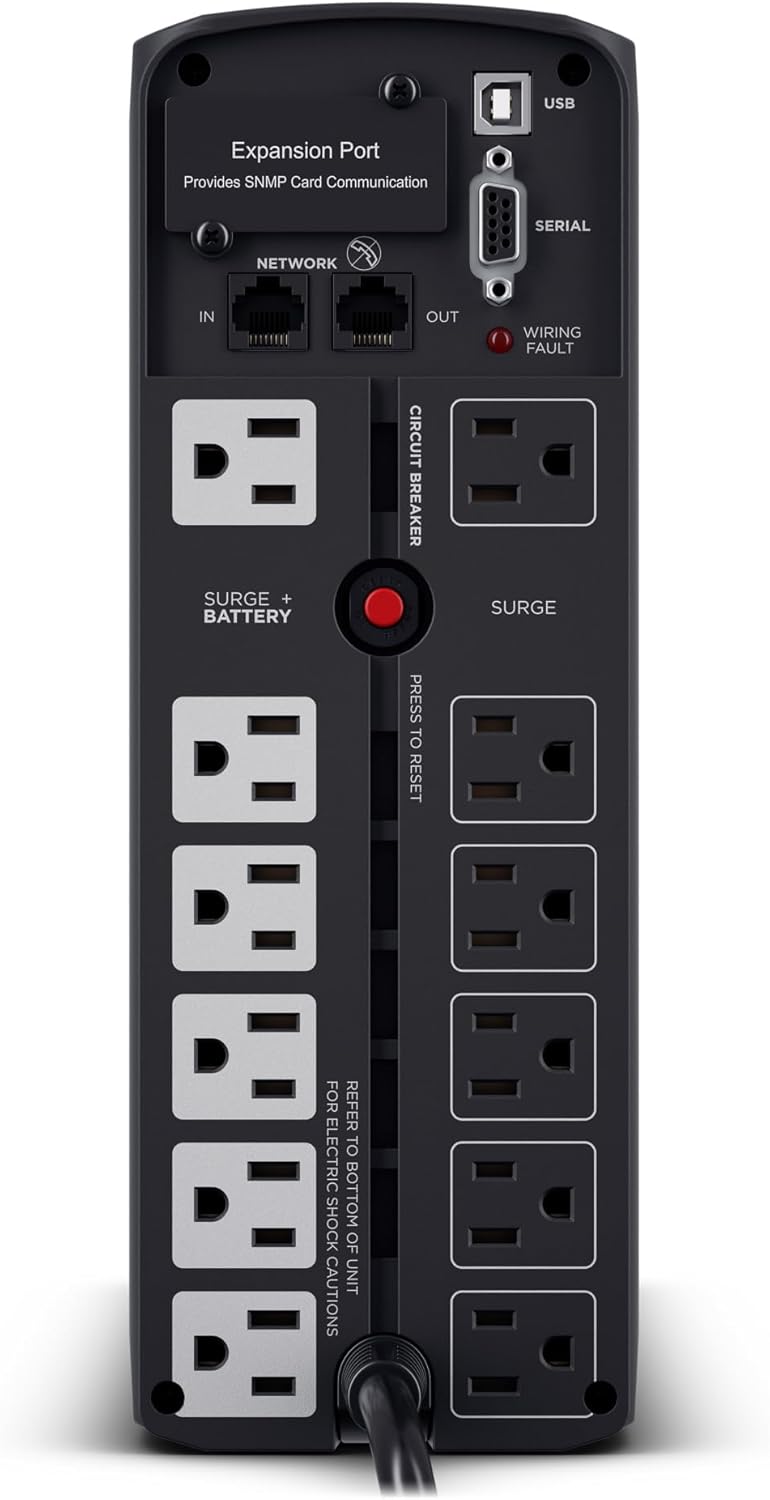
CyberPower
$239.95
In stock on Amazon
Check price on AmazonAPC BR1500MS2: Reliable Long-Term Track Record
APC has the longer track record in this product category, and owners tend to report reliable performance with low drama over multi-year deployments. The most practically important data point in aggregated owner experience concerns generator compatibility. Owner accounts document the APC BR1500MS2 transferring cleanly when a portable generator was online during an extended outage lasting several hours. That behavior matters for anyone in a region with extended grid instability: generator output is notoriously noisier than utility power, with its own waveform irregularities, and a UPS that handles the transition gracefully on both sides — utility failure and generator handoff — is meaningfully more capable than one that tolerates only clean grid power.
APC’s PowerChute management software is mature and integrates with VMware, Synology DSM, and most major NAS operating systems without significant configuration friction. If you’re running a Synology NAS specifically, Synology’s native UPS support recognizes APC units with minimal setup steps.
The recurring criticism in APC reviews at this VA class centers on two patterns: some owners report that warranty and support interactions felt slower than expected, and replacement batteries from third-party sources vary enough in quality that manufacturer-sourced replacements are strongly advisable. That second point is worth emphasizing because the 3–5 year battery replacement cycle means you will be buying a replacement — and counterfeit or undersized SLA batteries are a documented problem in this product category on major retail platforms.
CyberPower
$239.95
In stock on Amazon
Check price on AmazonCyberPower CP1500PFCLCD: Higher Watt Ceiling and More Informative Display
The CyberPower CP1500PFCLCD earns converts among owners who have specifically switched from APC units in the same VA class. The documented complaint driving those switches is inconsistent behavior during brownouts — voltage sag events where some APC units transfer to battery when they shouldn’t, causing unnecessary cycling and accelerated battery wear. Owners who switched to the CyberPower describe its transfer threshold as more conservative and predictable under the same grid conditions.
The 1000W ceiling versus APC’s 900W is a concrete advantage for high-wattage setups. A GPU-equipped editing or gaming workstation under load can pull 300–400W by itself. Adding a 4-bay NAS (typically 50–80W), a router (15–20W), and a monitor (30–60W) brings the total close to 900W faster than the spec sheet makes obvious. The CyberPower’s extra 100W of headroom matters in those configurations.
The LCD display on the CP1500PFCLCD is consistently praised in aggregated owner accounts as more readable and informative at a glance — showing load percentage, estimated runtime, and input voltage simultaneously. For right-sizing and day-to-day monitoring, that visibility is genuinely useful.
CyberPower’s PowerPanel software integrates with Synology DSM and QNAP QTS through standard SNMP and USB management paths, though owners note that APC’s Synology integration has slightly less configuration friction out of the box.
CyberPower
$239.95
In stock on Amazon
Check price on AmazonGOLDENMATE LiFePO4: The Long-Battery-Life Alternative
If your primary frustration with conventional UPS units is the 3–5 year lead-acid battery replacement cycle — and the hassle and cost that entails — a LiFePO4 (Lithium Iron Phosphate) UPS represents a fundamentally different value proposition. The GOLDENMATE LiFePO4 unit at this power class carries a rated battery lifespan significantly longer than sealed lead-acid alternatives, with the manufacturer claiming up to 10 years of service life under normal cycling conditions.
Owner reports on the GOLDENMATE unit include accounts of it successfully protecting a high-end gaming PC with a current-generation discrete GPU through both brownout (flickering) and full outage events. That real-world validation speaks to the waveform output quality — the unit is delivering clean enough power that demanding hardware continues operating normally during the transfer window.
The honest tradeoff: LiFePO4 UPS units at this power class carry a higher upfront cost. The long-term math only favors them if you account for two to three lead-acid replacement cycles at $30–$80 each over the same period. For a set-and-forget buyer who doesn’t want to track a maintenance calendar or source replacement batteries, the case is real. For a buyer already comfortable with SLA battery replacement as routine maintenance, the cost delta may not justify itself within a five-year planning horizon.
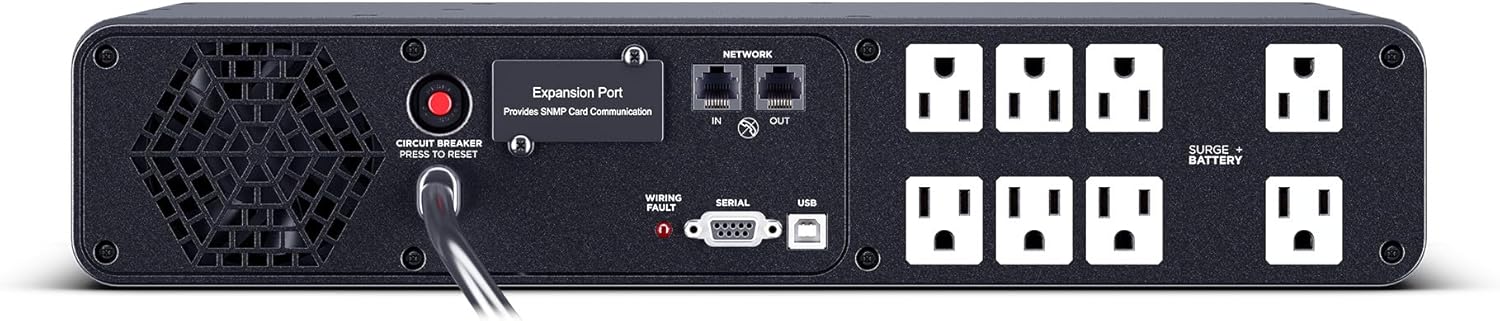
CyberPower
$299.95
In stock on Amazon
Check price on AmazonSelf-Test Alarms: The Most Misunderstood UPS Behavior
Across aggregated owner reviews for all three units discussed here, one surprise recurs consistently: owners report being alarmed by their UPS beeping, causing connected equipment to flicker, or appearing to fail outright — only to discover the unit was performing its scheduled self-test. Both APC and CyberPower units perform periodic self-tests that briefly transfer to battery, which can cause a momentary output variation and trigger the audible alarm.
The Wirecutter / New York Times guide The Best UPS Battery Backup for a Home Office (2025) specifically calls out self-test behavior as one of the most commonly misunderstood aspects of UPS ownership, noting that it has led to unnecessary return-merchandise events. If your UPS beeps unexpectedly and your equipment momentarily flickers during a scheduled test window — which both brands default to weekly — check the LCD display for a “Self Test” or “Testing” indication before assuming a hardware fault.
Frequently Asked Questions
What is the difference between pure sine wave and simulated sine wave UPS output, and does it matter for a NAS?
Pure sine wave output mimics the smooth, wave-shaped current from utility power. Simulated (stepped approximation) sine wave output uses a staircase pattern that approximates it. Most NAS units from Synology, QNAP, and similar manufacturers specify pure sine wave input in their support documentation. Using a simulated unit creates risk of erratic behavior during the battery transfer window — the milliseconds the UPS takes to switch from wall power to battery.
Will a UPS labeled “active PFC compatible” work with my Mac or modern PC power supply?
Yes — “active PFC compatible” on a UPS label means it outputs pure sine wave power, which is what modern Mac and PC power supplies with active PFC designs require. The two terms are effectively synonymous for purchasing purposes. Confirm the label says “pure sine wave” or “active PFC compatible” before buying any UPS for Apple hardware or a recent gaming or workstation PSU.
How do I calculate how many watts my NAS plus router plus workstation actually draw?
Add up the rated wattage of each device. A 4-bay NAS typically draws 30–80W under load. A router draws 15–25W. A workstation without a discrete GPU draws 80–200W; with a mid-range GPU, add 150–300W more. A monitor adds 30–60W. Total those figures, then size your UPS so the load stays below 80 percent of the unit’s watt rating — not the VA rating. The watt figure is what governs real-world load capacity; VA is a different electrical measurement and consistently overstates usable capacity when used as a direct comparison.
Can I use a home UPS with a portable generator during extended outages?
Yes, with caveats. Portable generators produce noisier power than utility grid power — meaning the waveform has more irregularities. A pure sine wave UPS adds a layer of conditioning between the generator and your equipment, which is the intended use. For generator use, inverter-type generators are strongly preferred over conventional generators for sensitive electronics because their output more closely approximates clean utility power. Confirm your UPS’s transfer voltage threshold isn’t set so conservatively that it constantly switches to battery in response to the generator’s slightly irregular input.
How long does a 1500VA UPS actually run a NAS and router during a power cut?
At a light load — NAS plus router only, roughly 80–120W total — expect 30–50 minutes of runtime from a 1500VA/900–1000W unit with a fresh battery. Add a full workstation and runtime drops sharply. At 400W total load, plan on 12–18 minutes. Runtime calculators from both APC and CyberPower are available directly on their respective manufacturer websites and allow you to model your specific load. The goal for most setups isn’t indefinite runtime; it’s enough time for DSM or your OS to execute a graceful shutdown sequence, which typically needs 2–5 minutes.
When should I replace a UPS battery and how do I know when it is failing?
Replace proactively at the 3-year mark if you’re in a climate with wide temperature swings or if the unit sees frequent power events. Failing batteries manifest as: estimated runtime dropping significantly on the LCD display, the unit failing its self-test and displaying a fault code, or the unit reaching a reported full charge faster than it used to. Buy replacement battery cartridges directly from the manufacturer or an authorized distributor rather than third-party marketplace listings, where counterfeit SLA batteries are a documented issue.
The Decision Rule
If your setup is NAS plus router only, both the APC BR1500MS2 and the CyberPower CP1500PFCLCD are defensible choices. Default to whichever has better current availability and pricing.
If your setup includes a Mac, a modern gaming PC, or any active PFC desktop PSU, pure sine wave output is mandatory — confirm the label before you buy.
If you’re in an area with extended outages or generator use, the APC BR1500MS2’s documented generator compatibility gives it a meaningful edge based on owner-reported real-world performance.
If you’re running a high-wattage workstation with a discrete GPU alongside a NAS, the CyberPower CP1500PFCLCD’s 1000W ceiling versus APC’s 900W matters — you have more headroom before pushing the unit past its comfortable operating range.
If battery replacement friction is your primary concern and you’re planning on a seven-to-ten year horizon, model the LiFePO4 math against two lead-acid replacement cycles. The GOLDENMATE unit’s owner reports are encouraging, though its long-term track record is thinner than either APC or CyberPower at this writing.
Whatever unit you choose, test the restore path within the first week. Plug in a non-critical device, pull the wall plug, and confirm the UPS transfers cleanly and the runtime matches the LCD estimate. Untested protection isn’t protection — it’s an assumption.